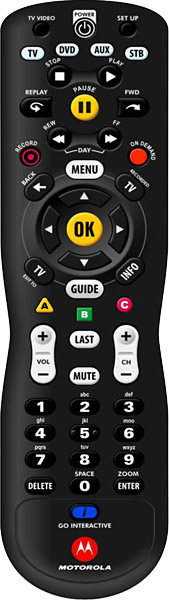

POWER: CODE SEARCH METHOD
- Turn on your TV.
- Press and hold the SETUP button until the STB button blinks twice.
- Press the TV button. The TV button will stay lit.
- Press and hold down the OK button until your TV turns off.
- Press OK to save the code.
SETTING VOLUME CONTROLS
- Press and hold the SETUP button until the STB button blinks twice.
- Press the VOLUME + (volume up) button.
- Press the mode button (TV, DVD or AUX) that corresponds to the device that you want to use for volume control.
DVD & AUXILARY DEVICES: CODE SEARCH METHOD
- Turn on the DVD player or other auxilary device you wish to program
- Press and hold the SETUP button until the STB button blinks twice.
- Press the mode button (DVD or AUX) for the device you wish to setup. The mode button (either DVD or AUX) will stay lit.
- Press and hold down the OK button until the device you are programming turns off.
- Press OK to save the code.
If the above steps do not work, please contact our office for assistance.